You can also access some animated lessons about the GUI"Graphical User Interface" A GUI is a type of user interface which allows people to interact with a computer and computer-controlled devices here.
In the integrated workspace, all child windows are integrated into a single larger application window.
With the MDI"Multiple document interface" Graphical computer applications with an MDI are those whose windows reside under a single parent window (usually with the exception of modal windows), as opposed to all windows being separate from each other (single document interface). Advantages: - With MDI, a single menu bar and/or toolbar is shared between all child windows, reducing clutter and increasing efficient use of screen space - An application's child windows can be hidden/shown/minimized/maximized as a whole - Features such as "Tile" and "Cascade" can be implemented for the child windows/Tabbed workspace command in the Window menu, you can choose to display the child windows either as Tabbed Document Interface (TDI) or as Multiple Document Interface (MDI).
When in MDI mode, you can move and resize the displayed windows.
The Cascade command automatically rearranges all the windows to provide you with easier access to each of them.
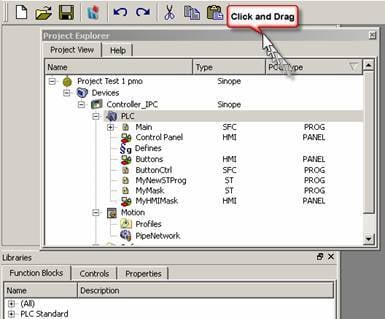
All toolboxes can be moved within the workspace to a more appropriate location. To customize your workspace, click in the Toolbox header and move the window using drag-and-drop. The other toolboxes are adapted accordingly.
You can separate out a toolbox and change it to a docking window to be placed in the workspace independently of the other toolboxes.
 How to change a toolbox to a Docking window?
To do so, click the  icon (you can also double-click in the toolbox header).
Double-click to place the window back into its original position.
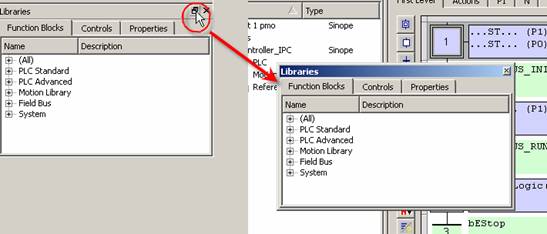
Moving a toolbox to a docking window can lead to problems which can be difficult to recover.
How to undock a window?
If problems arise, drag-and-drop the window to a toolbox border as shown below:
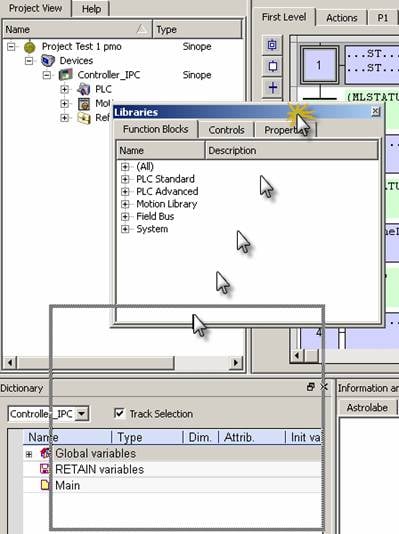
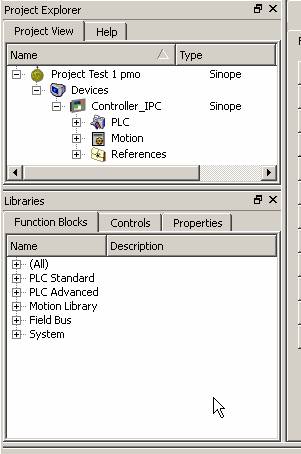
Dropped in the bottom border of the Project Explorer toolbox, then the Libraries toolbox is moved nearby.
|
Stay Connected with Kollmorgen       
|
Copyright © 2015 Kollmorgen™ |

|
 [Top]
[Top]